Tuesday, 29 January 2013

ANDROID KEY LIME PIE FEATURES

android key lime pie
    As all expecting Android 5.0 key lime pie will be release in march or april month of 2013.Here in this Article I will tell you some possible featuers of android key lime pie which are better then jelly bean.
Better back-up
In many developing markets, battery back-up is the first thing mobile buyers look for. As processor capacity and speeds are multiplying manifold, a better back-up should ideally be high on priority for the manufacturer.
Social media
Rather than promoting only its own social network, Google+, it would be interesting if Google were to put together other popular social media, be it Facebook or Twitter, under one icon, upon Key Lime Pie release. We can't rule out that it is unlikely.

Video chat app
Google might utilize its in-house software expertise to offer an exclusive video chat application, something improvized from its Google Talk and Hangout, on its devices.
key lime pie android features


Built for quadcore
Most of the recent smartphones are running the very efficient quadcore processors, which can multitask the best. So, expect Android 5.0 to be built for it.
Voice assistant
If Google has to take the fight to Apple iOS in the real sense, a superior voice assistant is a prerequisite. And, even better if it irons out the flaws encountered by Siri users and makes Google Now more efficient than just throwing up multiple search results, help locate addresses and make calls.
Improved photo effects
With in-built camera capabilities are increasing by the day, here's hoping Google would leave no stone unturned to better its photo editing tools and with that, other camera features. It would be a bonus, if real-time facial recognition is enabled for images and videos.
   So friends these are expecting features of android 5.0 key lime pie.If you got some news about key lime pie then share it to people in comments.

Saturday, 26 January 2013

ANDROID 5.0 KEY LIME PIE RELEASE DATE

android 5.0 key lime pie
                 Google's showing no signs of slowing its pace of Android development, with Android 4.0 appearing on the Galaxy Nexus late in 2011, followed in July of 2012 by the Android 4.1 Jelly Bean release that arrived powering the super Nexus 7.
                But, forward-looking, update-obsessed people that we are, we can't help but imagine how Google's going to maintain the pace of innovation in its next version of its mobile OS, Android 5.0.
All we know so far is that Google's working away on the K release of Android, which it's developing under the dessert-related codename of Key Lime Pie. Regarding the version number, it's likely that the Key Lime Pie moniker will be given to Android 5.0. We thought we might find out on 29 October but as yet there is no official word from Google.
android 5.0 key lime pie

                 Rumours of a new Nexus handset started trickling in during the third quarter of 2012,  There was speculation that this phone would be sporting Key Lime Pie, but sources who spoke to AndroidAndMe correctly claimed that the handset, which turned out to be the Google Nexus 4 would be running Android Jelly Bean.
            So now as we wait on official news of the Android 5.0 release date and features, we can start to pull together the Key Lime Pie rumours from around the web, with the first sighting of Android 5.0 on a benchmarking website, apparently running on a Sony smartphone. There has previously been speculation that Sony is in line to produce the next Nexus phone, which may lend some credence to this rumour.

Android 5.0 release date

Google has announced that its next developer conference - Google IO - will take place from May 15 to May 17 2013, a month earlier than 2012's June dates. Given that Google announced Android 4.1 Jelly Bean at 2012's IO conference, it's not unreasonable to expect to see Android 5.0 at this year's event.

WINDOWS 8 FEATURES


windows 8 start button
                   Hello friends Here in this article i will tell you why windows 8 is better then windows 7?And How it provides best graphical user interface?
Where’s the Start button?
With most versions of windows, the Start button, located in the bottom left of the screen, was how you launched all your programs and found the majority of your files. Windows 8 doesn’t have a physical start button, rather the new tile interface is the start menu. Now you just swipe to the tile/program, and click it to open.
For small businesses looking to introduce mobile apps targeted at tablet or other large touchscreen users, or integrate tablet devices into the office, Windows 8 makes sense. For most other companies, the adoption and learning curve may take time to get used to. Most users we talked to agree, but note that once they get used to it, it’s great.
Windows 8 changes the desktop
The biggest change Windows 8 brings is the change to the desktop layout. Windows 8 defaults to a new touch-oriented layout that uses tiles similar to the ones found on their Windows Mobile operating systems. This change is an indication that Microsoft is going to be throwing considerable weight into the post-pc era, where devices like tablets and touchscreens work beside or replace conventional PCs.
This change from a file and folder oriented desktop to a tile oriented one could intimidate users who are unfamiliar with a mobile OS, or are less than comfortable with computers. It’s not like a user comfortable with XP or Windows 7 will be completely lost, as all of the existing programs that were icons on your desktop are now tiles with the icon clearly visible.
For those who are really uncomfortable with the new interface, pressing the Desktop tile will take you to the more traditional desktop Windows users might be more comfortable with. The best way to think of the desktop interface is Windows 7 with a mobile-ish overlay. Windows has noted that most Windows 7 programs will work just fine on Windows 8, however custom made programs may have issues and need to be upgraded to support the new layout. If you use custom made software, it is a good idea to contact the vendor/developer before upgrading.


windows 8 applications
Any new useful features?
There are a number of new features that many businesses will benefit from with adoption. Windows 8 focuses on collaboration and mobility more than almost any other OS. On the control side, administrators have a program called AppLocker which enables adminstrators to easily control employee’s access to files and programs, while pushing out updates to all computers at once.
Another interesting feature is that Windows 8 supports profile syncing through the cloud and USB sticks. Employees can sit down at any workstation, sync their profile and have access to their own system’s layout quickly and easily. Alternatively, they can use USB sticks to save their Windows session and have access to it when they plug in the USB. This makes the OS a lot more mobile.
While there are features of Windows 8 that businesses will utilize, it’s the programs that will define the success of this OS. Many businesses still use Microsoft XP and Microsoft has essentially stopped support for it. You’ll come across some issues when upgrading Microsoft programs. For example, if you use XP in the office and want to upgrade to Office 2013, you’ll have to upgrade to either Windows 7 or 8 (Microsoft would prefer it if you picked Windows 8).
This decision will force all vendors and software developers to either write two programs, one that supports XP, and the other that supports Windows 7 and 8. Most developers will likely just chose to drop support of XP. Essentially, this will force businesses to upgrade if they want support.
What about RT?
With the release of Windows 8, Microsoft also released a tablet oriented OS that’s based on Windows 8, Windows RT. The only difference is RT doesn’t run Windows desktop programs, rather it’s configured to run RT specific or cloud versions of programs. This could hamper collaboration between devices that run the two different systems. In other words, if you’re looking to upgrade, ensure the systems you choose are compatible. There will be a flood of Windows 8 tablets – tablets using Windows 8, not RT – and ultrabooks in the next few months.

Friday, 25 January 2013

CLUSTER COMPUTING INTRODUCTION

cluster computing
              In computers, clustering is the use of multiple computers, typically PCs or UNIX workstations, multiple storage devices, and redundant interconnections, to form what appears to users as a single highly available system. Cluster computing can be used for load balancing as well as for high availability. Advocates of clustering suggest that the approach can help an enterprise achieve 99.999 availability in some cases. One of the main ideas of cluster computing is that, to the outside world, the cluster appears to be a single system.
cluster computing

             A common use of cluster computing is to load balance traffic on high-traffic Web sites. A Web page request is sent to a "manager" server, which then determines which of several identical or very similar Web servers to forward the request to for handling. Having a Web farm (as such a configuration is sometimes called) allows traffic to be handled more quickly.
Clustering has been available since the 1980s when it was used in DEC's VMS systems. IBM's Sysplex is a cluster approach for a mainframe system. Microsoft, Sun Microsystems, and other leading hardware and software companies offer clustering packages that are said to offer scalability as well as availability. As traffic or availability assurance increases, all or some parts of the cluster can be increased in size or number.
             Cluster computing can also be used as a relatively low-cost form of parallel processing for scientific and other applications that lend themselves to parallel operations. An early and well-known example was the Beowulf project in which a number of off-the-shelf PCs were used to form a cluster for scientific applications.

UNLOCK VODAFONE K3770 MODEM

ZTE K3770 is  3G Modem Available in market with 7.2 MBPS supporting Speed.
Although it is ZTE modem it comes unlocked as it comes from the market you just need to setup the access point name of the network you want to use in the modem. Here in this article i will mention how to set up this in few simple steps.


Unlocking Tutorial :

1. Firstly insert any other SIM Except Vodafone in your Modem.

2. Then let it load drivers in your computer and install the Vodafone Broadband Dashboard to Your Desktop/Laptop.

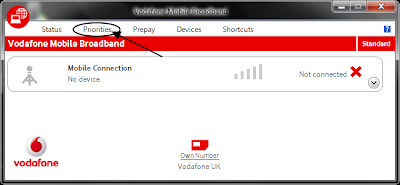
3. It will Show an Error Message About the Sim Just Ignore That. Now Run the Vodafone Broadband Dashboard.

vodafone k3770 modem unlock

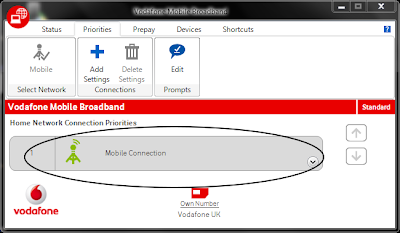
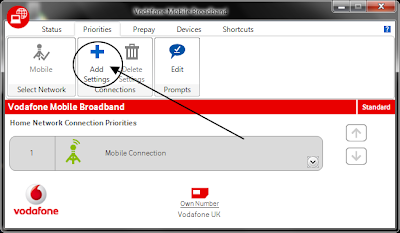
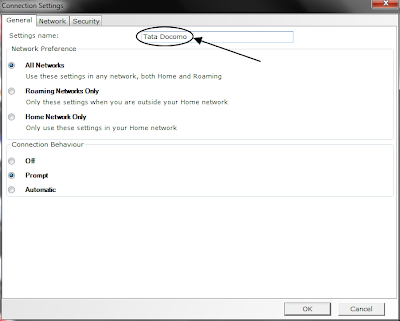
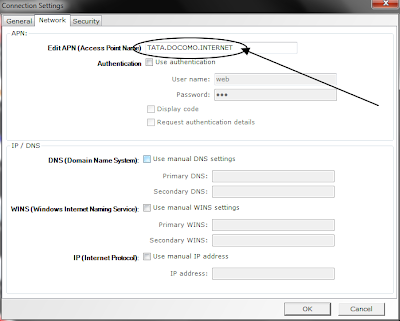
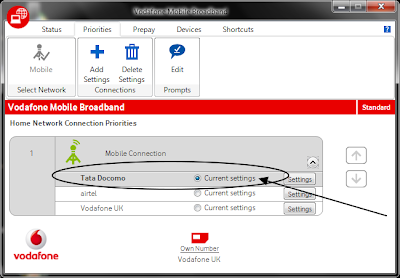
4. Go to Priorities and set a new connection name and then goto Networks Tab.


vodafone k3770 modem unlock
5. Insert Access Point Name Of the Network or Sim Operator you want to use.

vodafone k3770 modem unlock
6. Keep other spaces as it is or else empty. Press Ok and Use the Setting Name as current Setting and Plug out the Modem.

vodafone modem unlock
7. Now again Run the Dashboard and you will see 3G or 2G network of whatever SIM Operator you are using.

8. Here is the Most important Step don't click on connect just Goto Network and Sharing Center and then connect the network operator there.

Saturday, 19 January 2013

IDEA FREE GPRS TRICK 2013

IDEA FREE GPRS TRICK 2013
I am here with the Free GPRS settings for the IDEA 3g to use the Free Internet In the month of january 2013.

Settings for Idea Free GPRS Trick September 2012


Apn : Imis (or) Mmsc
Proxy : 10.4.42.15
Port : 8080
Homepage : any one from below.https://concealme.com https://flyproxy.com
https:// hot-proxy.info
https:// Fire-proxy.com
https:// Proxyforall.com
https:// Abcproxy.com
I hope this free gprs trick for idea is working for you
Related Posts Plugin for WordPress, Blogger...